

Computer ergonomics
Learn how to prevent health problems such as musculoskeletal disorders when using computers or mobile technology.
Overview
Using computers or mobile technology (for example, laptops, tablets and mobile phones) for extended hours can result in:
- muscular fatigue and discomfort, usually in the back, arms, shoulders and neck
- visual fatigue, including eyestrain, burning eyes, blurred vision and headaches
If this work is done in awkward postures, there is a risk of developing a musculoskeletal disorder (MSD). The risk increases as postures become more awkward and the duration of holding those postures increases.
Legal requirements
The following outlines the specific legal requirements under the Occupational Health and Safety Act regarding the use of computers or mobile technology:
Keep equipment in good condition
Under clause 25(1)(b), employers must make sure the equipment, materials and protective devices they provide are maintained in good condition.
Some examples of problems are:
- broken height-adjustable equipment
- chairs that are in disrepair
- keyboard trays that aren't functioning correctly
- malfunctioning overhead or task lighting (small lamps for a specific area)
Provide information, instruction and supervision
Under clause 25(2)(a), employers must provide workers with information, instruction and supervision to protect their health and safety.
Examples of information and instruction can include:
- computer ergonomics and workstation setup
- how to recognize and report MSD hazards
- how to recognize the signs and symptoms of MSDs and the importance of early reporting
- work practices and controls for MSD hazard prevention
Communicate hazards
Under clause 25(2)(d), employers must make sure that workers or a person in authority over a worker (for example, supervisor or manager) are acquainted with the hazards in their work. This includes MSD hazards when working with computers or mobile technology.
Take every precaution reasonable in the circumstances
Under clause 25(2)(h), employers must take every precaution reasonable in the circumstances for the protection of a worker, including from MSD hazards while working with computers or mobile technology.
See Preventing injuries for some examples of precautions.
Regulations that apply
Some sector-specific Occupational Health and Safety Act regulations may also apply to working with computers or mobile technology, including:
Industrial Establishments
Under section 21 of Regulation 851 - Industrial Establishments, employers must provide artificial lighting and reduce shadows and glare to a minimum when there is inadequate natural lighting.
Health Care and Residential Facilities
Under sections 22-24 of O. Reg. 67/93 - Health Care and Residential Facilities, employers must:
- provide illumination that meets the minimum lighting requirements set out in Part 3 of the Ontario Building Code
- keep brightness levels and ratios, glare, contrast and shadows at a level that is not likely to be a hazard to a worker
- limit glare and reflection that are likely to be a hazard to a worker as much as reasonably possible
- if glare from a direct lighting source is likely to be a hazard to a worker, shield it using louvres (angled slats across a window), lenses, lens covers or diffusers that control the glare
- if a worker uses a video display terminal (for example, computer or mobile technology screen) continually for one hour or more, make sure they have at least 5 minutes free from such work every hour
Preventing injuries
Factors that can affect both the physical and visual demands of a worker are:
- the worker's posture, which is determined by the layout of the workstation including:
- components of the computer (keyboard, monitor, mouse, etc.)
- furniture and aids (chairs, desks, document holders, etc.)
- lighting
- glare
- breaks from computer work
Worker posture
While working with computers or mobile technology, a worker can experience muscular fatigue and discomfort due to their posture. The worker's posture often depends on the:
- location of the computer or mobile technology
- layout of the workstation
- furniture provided
Whether standing or sitting, a worker should be able to work in a neutral posture when working with a computer or mobile technology in order to minimize postural demands.
A neutral sitting posture is described as:
- neck is upright and over the shoulders (not bent, twisted, or forward)
- relaxed shoulders (not slouched or raised)
- upper arms hanging vertically alongside the body (not reaching)
- elbows close to the body and at 90 degrees when typing
- forearms horizontal to the ground
- wrists straight (not bent up, down or sideways) when typing
- back straight (not slouched) and well supported by the chair
- thighs approximately horizontal to the ground
- feet flat on the floor or on a foot rest, with the feet at an angle of 90 degrees with the lower legs
A neutral standing position is described as:
- head, neck, body and legs approximately in line and vertical
- a leg may be raised for short periods of time using a foot support
- when performing work at a computer:
- relaxed shoulders (not slouched or raised)
- upper arms hanging vertically
- elbow close to the body and at 90 degrees
- wrists straight (not bent up or down or turned or tilted) when typing
While workers should be able to work in neutral postures when sitting or standing, any posture can be tiring after some time.
In order to avoid the negative effects of prolonged sitting or standing in one posture for extended hours, workers should be able to:
- switch between sitting and standing
- change their seated or standing postures as shown in Figure 1: Examples of working postures
This can be achieved by switching between sitting and standing or with adjustable equipment (for example, chairs, desks, monitors or keyboard supports).
Figure 1: Examples of working postures
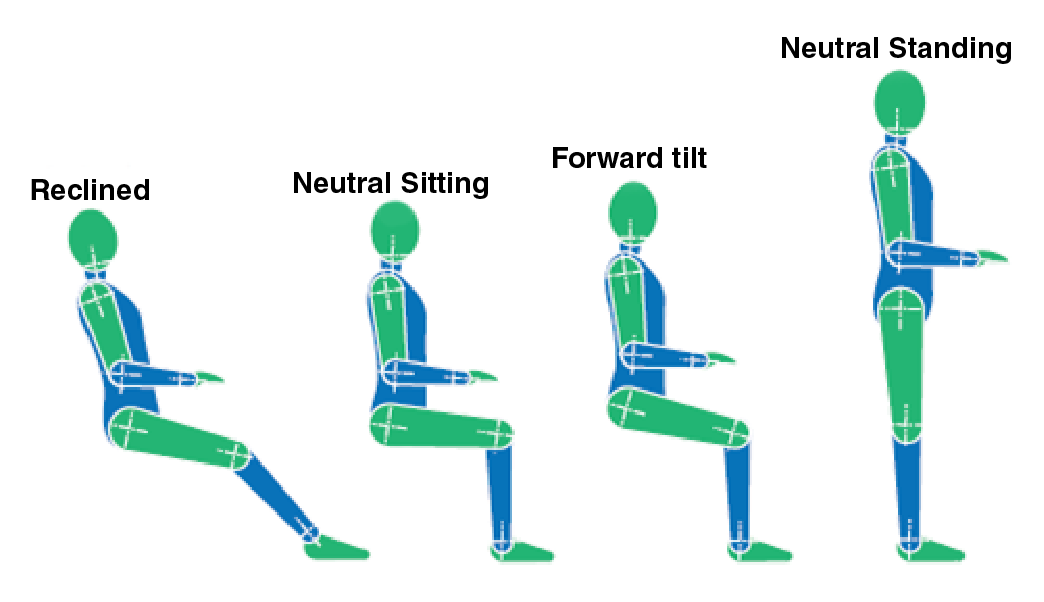
(Source: adapted from Figure A.1, CSA Z412-17 - Office ergonomics - An application standard for workplace ergonomics. © 2017 Canadian Standards Association)
Adjustable equipment lets a worker change postures and helps workers of different abilities and sizes use the same workstation.
Equipment should be selected and positioned so that parts of the body are not exposed to contact stress (stress that occurs when the skin and underlying tissues of a body part are exposed to pressure from resting or rubbing against a hard or sharp object).
Examples of typical sources of contact stress when performing computer work include:
- behind the knees due to contact from the chair seat
- wrists due to contact with the edge of the desk
- elbows and forearms due to contact with hard armrests or edge of the desk
For more information on workstation setup, please see the Canadian Standards Association standard on office ergonomics: Z412-17 Office ergonomics - An application standard for workplace ergonomics.
Lighting
When planning computer work environments, you must consider:
- overall lighting levels
- position of lights and windows
Good lighting levels and positioning leads to minimal glare, appropriate contrast and less visual fatigue.
The Illuminating Engineering Society's, The Lighting Handbook (10th edition) recommends:
- horizontal light levels around 300 lux for the most commonly used screens (matte type which is less reflective or glossy) where there is dark text on a light background, measured at 76 cm from the floor
- lower light levels if the screen is more reflective or there is light text on a dark background
If O. Reg. 67/93 - Health Care and Residential Facilities, applies to your workplace, you must follow the minimum requirements for lighting in Part 3 of the Ontario Building Code.
However, the code does not require any specific lighting amount for offices or computer work. Therefore, the recommendations from The Lighting Handbook may apply.
Paper-based work or workers with impaired vision may need more light. In such cases, task lighting can be used.
Glare
The lighting system in the workplace should allow for uniform light levels. Glare is caused by large differences in light levels within the visual field. Excessive light levels may mask (or partly hide) what is shown on the screen.
While a worker's eyes try to adapt to large differences in light levels, visual fatigue and discomfort may result. The worker may also adopt a poor posture while trying to reduce glare by changing their body position to the screen, which may result in neck and back pain.
Causes of glare include:
- bright light sources directly in the field of view, such as windows or uncovered lights
- light from windows or overhead lighting reflecting off shiny surfaces in the field of view, such as screens, desks and other office equipment
- light from sources directly overhead
You can reduce or eliminate glare by:
- tinting windows
- using light-absorbing blinds or curtains
- using parabolic louvres (which reduce the brightness of lights and distribute lighting evenly) on overhead lights
- using desks and work equipment with a matte finish
- positioning workstations between rows of overhead lights
- using indirect lighting (light from fixtures does not shine into the work area directly but only after being reflected off ceilings and walls)
- positioning computers in such a way that the line of sight is parallel to windows and overhead fluorescent lights
Breaks from computer work
Maintaining any posture over time is fatiguing, no matter how well the workstation is set up. Computer tasks such as continual data entry or word processing are highly repetitive and can further contribute to muscular and visual fatigue and discomfort, and may lead to injury.
In workplaces covered by O. Reg. 67/93 - Health Care and Residential Facilities, employers must provide workers who use a computer continuously for one hour or more with at least 5 minutes of time away from such work every hour.
The 5-minute break should not be accumulated. Short and frequent breaks are much more effective in preventing excessive fatigue and possible injury than longer, less frequent breaks.
Although the regulations for other sectors do not specify how long or how frequent computer breaks must be, employers do have a general duty under the Occupational Health and Safety Act to take every precaution reasonable in the circumstances for the protection of workers.
Taking breaks away from intensive computer work is encouraged as a good practice. Inspectors may consider this as a reasonable precaution to protect the health and safety of workers.
One option is for the worker to take micro breaks, which are very short, frequent breaks from performing computer work.
Time spent away from computers and computer work should be as physically different from doing computer work as possible. For example, if you normally work sitting at a computer, you could do other work standing.
Contact us
If you need more information about safety requirements, please contact the Ministry of Labour, Training and Skills Development Health & Safety Contact Centre at:
1-877-202-0008 on Monday to Friday, from 8:30 a.m. to 5:00 p.m.- webohs@ontario.ca.
This resource does not replace the Occupational Health and Safety Act and its regulations, and should not be used as or considered legal advice. Health and safety inspectors apply the law based on the facts in the workplace.